Environment
Novell ZENworks Configuration Management 11.3
Situation
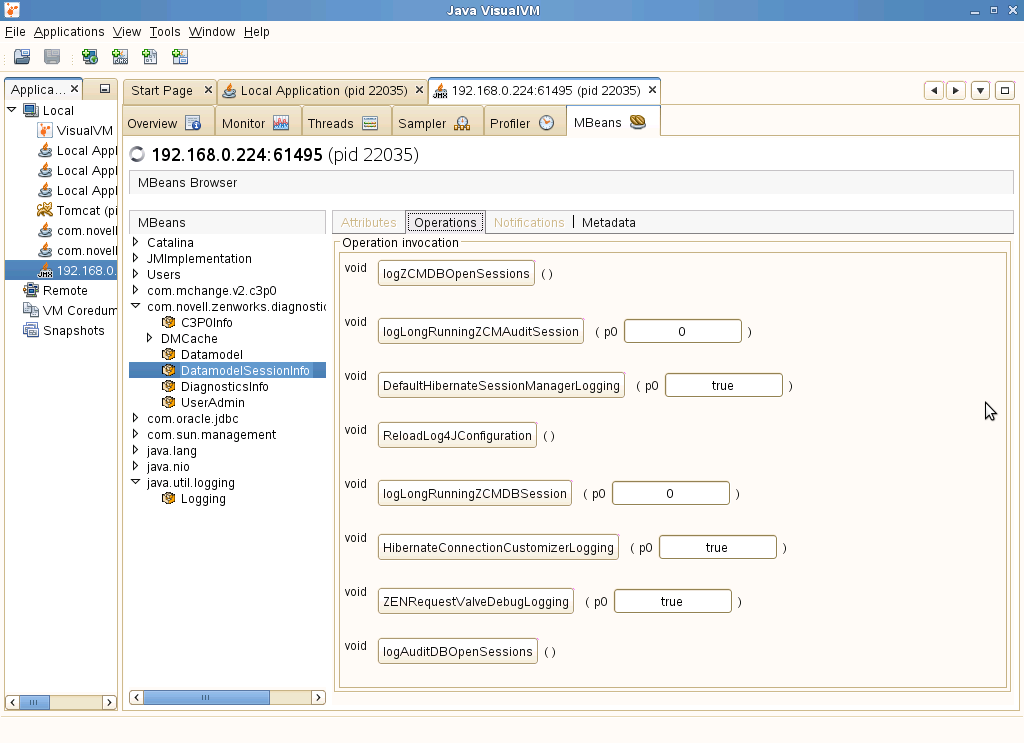
Prior to 11.3, to change ZENworks services logging for troubleshooting required a change to log4j.properties and restart of services. After 11.3 VisualVM can be used to do this dynamically without restarting services. This is helpful if restarting services would change a behavior being looked at.
Resolution
- Follow the documentation to set up VisualVM https://www.novell.com/documentation/zenworks113/zen11_cm_deployment_bp/data/b19nhqvr.html
- Backup then make required changes to log4j.properties file
/opt/novell/zenworks/share/tomcat/conf
%ZENWORKS_HOME%\tomcat\conf
NOTE: remember to make the file location correct for your zenhome. - Bring up VisualVM
- Enable MBeans and add the JMX connection per the documentation above.
- Open com.novell.zenworks.diagnostics.mbeans
- Open DMCache
- Open DataModelSessionInfo
- Click on ReloadLog4jConfiguration